
jQuery’s Ajax implementation
One of the most powerful jQuery functions is the Ajax function. The function provides enough options to make your XMLHttpRequest flexible enough to define;
- what type of response you need like to handle in your Ajax application (XML, JSON, HTML, script or text)
- an option about what the script need to do before the request is send (validations, set a pre-loading image, etc.)
- What to do after the request and response are successful
- and options like the request URL (f.e. your PHP script), the time-out value and more. Check the jQuery page for all available options.
The Ajax powered flickr image search
In this tutorial we will create a PHP script that will search the flickr database for posted values using the flickr API. On the client site we will use some simple HTML search form and some easy to understand jQuery Ajax code to handle the requests. If you like to test this tutorial code your should try our flickr Ajax search demo.
HTML search form
For this tutorial we create a simple form with only one search field and a button. Below the form we have a DIV container with ID result as placeholder for the images. Inside the header we need to include the latest jQuery library, download a copy from the jQuery website if you haven’t done yet.
<form>
<div>
<label>Enter keyword</label>
<input type="text" name="search" id="search" value="" />
<input type="button" name="submit" id="searchBtn" value="Search" />
</div>
</form>
<div id="result"></div>
jQuery Ajax functions
We use a click event to process the search if the user had clicked the forms button. Before we post the request to our PHP file getFlickr.php, we perform a test for the search field. If there is no search string we return to the document with an error message. Otherwise we send the posted value to our script for further processing. If the response is successful, we pass the data to our target container with the ID result$(document).ready(function(){
$('#searchBtn').click(function() {
var searchVal = $('#search').val();
$.ajax({
type: 'GET',
url: 'getFlickr.php',
data: 'search=' + searchVal,
dataType: 'html',
beforeSend: function() {
$('#result').html('<img src="loading.gif" alt="loading..." />');
if(!searchVal[0]) {
$('#result').html('<p>Please enter a keyword as search value.</p>');
return false;
}
},
success: function(response) {
$('#result').html(response);
tb_init('a.thickbox');
}
});
});
});
PHP code for the flickr API
the following PHP snippet is based on the flickr API tutorial from the last. If you need information about the API methods, please check the previous tutorial.
<?php
class Flickr {
private $apiKey = 'YOUR_API_KEY';
public function __construct() {
}
public function search($query = null) {
$search = 'http://flickr.com/services/rest/?method=flickr.photos.search&api_key=' . $this->apiKey . '&text=' . urlencode($query) . '&per_page=12&format=php_serial';
$result = file_get_contents($search);
$result = unserialize($result);
return $result;
}
}
if (!empty($_GET['search'])) {
$Flickr = new Flickr;
$data = $Flickr->search(stripslashes($_GET['search']));
$html = '';
if (!empty($data['photos']['total'])) {
$html = '<p>Total '.$data['photos']['total'].' photo(s) for this keyword.</p>';
foreach($data['photos']['photo'] as $photo) {
$html .= '
<img src="http://farm' . $photo["farm"] . '.static.flickr.com/' . $photo["server"] . '/' . $photo["id"] . '_' . $photo["secret"] . '_s.jpg" alt="" />';
}
} else {
$html = '<p>There are no photos for this keyword.</p>';
}
echo $html;
}
?>
In this script we accept only the POST GET values from the HTML form we have created. If the post GET var is empty we stop the script and shoot some default error, because the field validation was already done on the client side. Next we query the flickr API for the search value and if we have a positive result (getting some photos) we use a foreach loop to create the HTML code for the thumbnails (note the _s at the end of the image file name) At the end we echo the response in HTML format. Save this script under the getFlickr.php
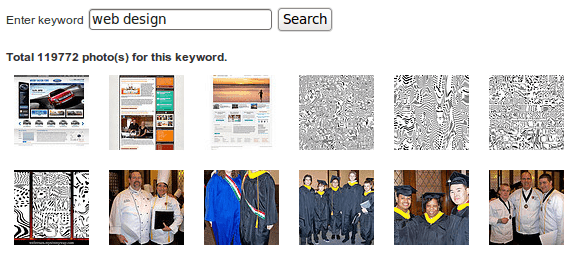
If everything works fine and your search has returned some photos, you script should looks like this:
If you need more control on how your form and result should work, check the jQuery documentation. Maybe you like to use more animation effects for the results.